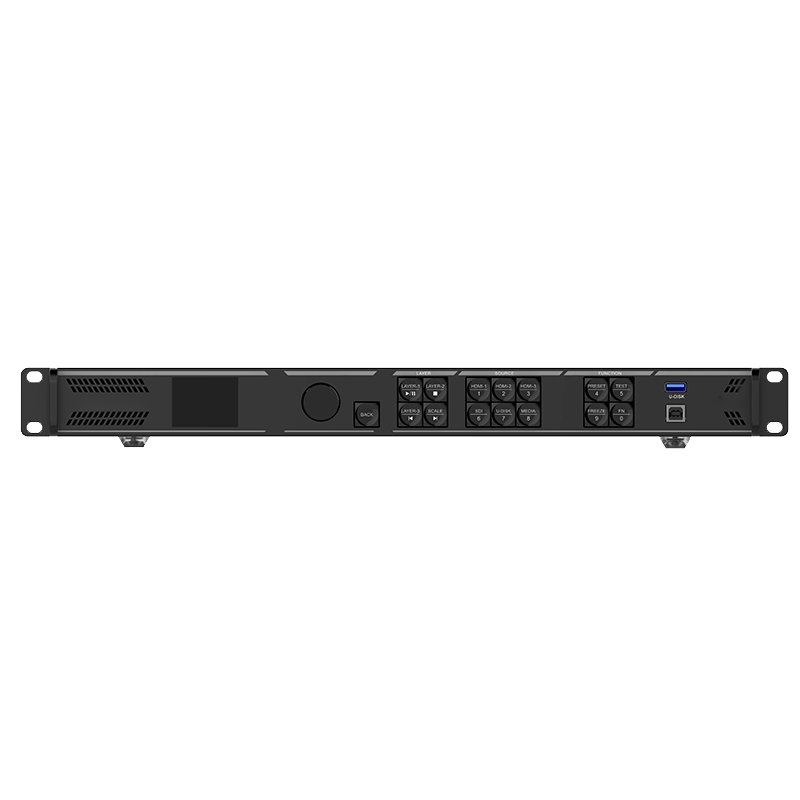
1. DEVICE DESCRIPTION
The S-LEDPRO-AIO39 is an all-in-one processor combining video processing and video control functionalities into a single device. Equipped with 6 Ethernet ports, it supports three working modes: video processor, fiber converter, and ByPass. Capable of managing up to 3.9 million pixels, the S-LEDPRO-AIO39 can output at a maximum width of 10,240 pixels and a height of 8,192 pixels, making it perfectly suited for controlling ultra-wide and ultra-high LED screens on-site.
The S-LEDPRO-AIO39 boasts powerful video signal reception and processing capabilities, supporting a maximum resolution of 4Kx2K@60Hz for video input. It can handle multiple video signal inputs and includes features like 6 layers, output scaling, low latency and pixel-level brightness and chroma calibration. These functions combine to deliver outstanding image display quality.
With various control options available, the S-LEDPRO-AIO39 can be operated via the front panel knob, Starview software and Starview app, providing you with a convenient and effortless control experience.
The S-LEDPRO-AIO39 is housed in an industrial-grade casing, which, combined with its powerful video processing and transmission capabilities, makes it robust and well-suited for complex operational environments. The S-LEDPRO-AIO39 is a perfect fit for medium and high-end rental, stage control systems and fine-pitch LED screens.
2. PRODUCT FEATURES
Multiple connectors, free input and output
-
A comprehensive range of input connectors
- 1x HDMI 2.0 (IN & LOOP)
- 2x HDMI 1.3
- 1x 10G optical fiber port (OPT 1)
- 1x 3G-SDI (IN & LOOP)
- 1x USB 3.0 (Play images or videos saved in a USB drive.)
-
Output connectors
-
6x Gigabit Ethernet ports. A single device supports up to 3.9 million pixels, delivering a maximum width of 10,240 pixels and a maximum height of 8192 pixels.
- 2x Fiber outputs. OPT 1 sends the output on Ethernet ports 1~6. OPT 2 copies or backs up the output on Ethernet ports 1~6.
- 1x HDMI 1.3, for monitoring display.
- 1x 3D connector, directly connect a third-party 3D emitter.
-
Self-adaptive OPT 1 for either video input or sending card output. Thanks to the self-adaptive design, OPT 1 can be used as either an input or output connector, depending on its connected device.
-
Audio input and output
- Audio input accompanied with HDMI sources
- 3.5 mm independent audio input and output
- Adjustable output volume
-
Free topology. Flexible screen configuration without rectangle restriction on a single Ethernet port. The maximum circumscribed rectangle of the large screen loaded by the device must be within the device loading capacity. (Specific receiving cards are required.)
- Low latency. By enabling the low latency feature and ByPass mode, the device delay can be reduced to 0 frame.
-
Output synchronization. An input source connected to the device's video connector or external Genlock source can be used as the sync source to ensure the output images of all cascaded units in sync.
-
EDID management. Import and export EDID files.
Diverse display possibilities for flexible configuration
-
Easy preset saving and loading
- Up to 256 user-defined presets supported
- Load a preset by simply pressing one button.
- Save, overwrite and delete a preset.
- Preview the layer layout saved in the preset.
-
Multiple layer display
- Supports 6*2K×1K layer resources. Users can create layers in three different specifications - 4K×2K, 4K×1K, and 2K×1K. These layers will use 4x, 2x, and 1x 2K layer resources respectively, depending on the capacity of the input source connector used to open the layers.
- Adjustable layer size and position
- Adjustable layer priority
- Adjustable aspect ratio
-
OSD function
-
Supports the text OSD and image OSD. For the text OSD, four components are available, including static text OSD, dynamic text OSD, weather OSD and time OSD.
- Supports customization of the text content, font, font color, size, opacity and background color.
- Supports configuration of the scrolling direction, initial position and speed for the dynamic text OSD.
-
3D function
-
Traditional solution: Connect the EMT200 Pro 3D emitter to the device's Ethernet port, and use the compatible 3D glasses to enjoy a 3D visual experience.
-
New solution: Connect the third-party 3D emitter to the device 3D connector and use the compatible 3D glasses to enjoy a 3D visual experience.
-
Note: When the 3D function is enabled and the video source format is Side-by-Side or Top-and-Bottom, the device output capacity will be halved.
- Personalized image scaling. Supports three kinds of image scaling modes, including full screen, pixel to pixel and custom.
-
Powerful video processing
- Based on SuperView III image quality processing technologies to provide stepless output scaling.
- One-click full screen display
- Free input cropping
- Color adjustment. Supports output color management, including brightness, saturation, contrast and hue.
-
Pixel level brightness and chroma calibration. Work with Starview software and Starview calibration software to support brightness and chroma calibration on each LED, which can effectively remove color discrepancies and greatly improve LED display brightness and chroma consistency, allowing for better image quality. The function of displaying image on screen for test is also supported.
USB playback, timesaving and effortless
- Supports USB playback for instant plug-and-play convenience.
Multiple device modes and operation modes, convenient and efficient
-
Various working modes
- Video processor
- Fiber converter
- ByPass
-
Multiple control options
- Device front panel knob
- Starview software
- Starview app
-
Remote control (optional). Enable or disable the device standby mode, power on or power off the screen, adjust the screen brightness and output volume, switch presets, set the USB playback parameters, adjust the output image quality, switch layer input sources and set the 3D function through a remote control. (For the descriptions of the remote control buttons and functions, please refer to the user manual.)
Data saving after power failure and backup design, stable and reliable
-
End-to-end backup
- Backup between devices
- Backup between input sources
- Backup between Ethernet ports
- Backup between OPT and Ethernet ports
- Dual receiving card backup
-
Device restoration. Up to 5 restore points can be created (total capacity limit: 1GB). Each restore point is a snapshot of the device configuration at a specific moment. If something unexpected occurs, simply select a restore point to quickly revert the device configuration to the state it was in at the time the restore point was created.
-
Ethernet port backup test. Test whether the pre-stored images, backup Ethernet ports and devices take effect without plugging and unplugging the Ethernet cables.
-
Data saving after power failure. After a normal shutdown or unexpected power outage, reconnecting the power will automatically restore the previously saved settings on the device.
- 24/7 rigorous stability test under extreme high and low temperatures proved robust stability and reliability.
3. DATASHEETS
Starview S-LEDPRO-AIO39 All-in-One Processor